
01 - JS Variables and Datatypes (Explained with examples)

Living an open source life!
Hello readers, welcome! By this blog we're going to start our JavaScript series where I'll be sharing my knowledge and some stories regarding the same to you all, this being the first article. Even if you're completely new to programming , don't worry.. I'll explain it as if a tree could understand too!
Yes, you heard it right. By the end of this article, even a tree would know how to store information using JavaScript. So grab your favorite beverages, get comfortable and let's embark on this exciting journey together!
So what exactly is JavaScript?
Before we start storing information, let's understand what JavaScript actually is.
The simple explanation
JavaScript is the programming language that makes your website come alive. Think of website like a human body
HTML - Skeleton
CSS - Skin , clothes..
JavaScript - Mind and Muscles ( movement and interaction )
Without JS a site is like a static magazine.. but with js it is a page that responds, calculates and interacts e.g dev.to , youtube.com , twitter etc.
Variables
What is a variable? Why do we need it at first place ?
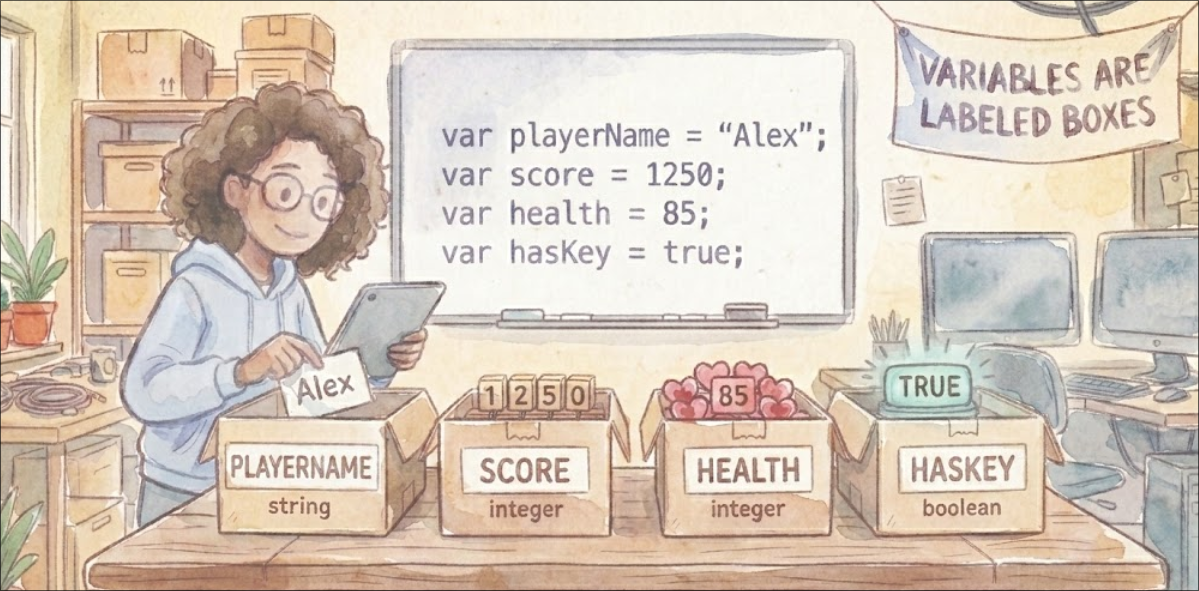
Variable is like labeled reference to a storage location. In more technical terms, A variable is an identifier that refers to a value stored in memory, which can be changed during program execution.
For example , like in maths :if x = 10 , "x" is a variable here
let x = 10 // x is a variable holding 10
Instead of accessing memory directly, we use the variable name to reference the stored data.
Declaring Variables
So now that we know what a variable is and why we use it... the next question is obvious:
How do we actually create one in JavaScript?
Let's see.
In JavaScript, we can declare variables using three keywords:
var
let
const
Sounds simple, right? You've probably seen these before. But What's the actual difference ? And which one should you use?
1. let - your default working variable
let age = 20; // made a variable named "age" with value 20 assigned to it
Now suppose next year your age changes .. can we update it?
age = 20 ;
Yes.
So we now know:
letis used when a value might change later.
simple.
2. const - when value should never change
Sometimes you don't want a value to change
For example :
const birthYear = 2003;
Try chaning it
birthYear = 2006;
You'll be stopped by JS with an error..
So what's the rule?
Use
constwhenever you can . As stability the thing world seeks the most.Use
letonly when you know the value will change.
This is actually how professional developers write code.
3. var - the older keyword with an issue
You might still see this :
var name = "Akhilesh yadav"
It works. JavaScript still supports it.
But modern developers avoid var because it behaves differently in ways that may confuse beginners.
We'll discuss about the problem with var in future articles.
CONCLUSION :
For now, just remember :
in modern JavaScript -> prefer
letandconst

Naming Rules (Identifiers) :
We know how to create variables - YES
Can we name them anything - NO
JavaScript has a few simple rules every variable must follow :
Must start with a letter ,
_or$CANNOT start with a number
CAN contain letters , numbers ,
_,$Names are case-sensitive (
Scoresandscoreare different)Cannot use JavaScript keywords (some reserved words of js e.g
let,const,if,return,functionetc.Cannot contain spaces or hyphens
Best Practices ( How good developers name variables)
These aren't rules .. you code will still run without them.
But following them makes your code cleaner and easier to understand.
And trust me, future-you will thank present-you for this.
Using meaning full names :
let x = 10 ; // confusing
let score = 10 ; // clear
Questions yourself :
If someone else read this , will they understand what's happening here or what are you tryna do here?
If yes --> good variable name .
Prefer const by default
If a value won't change, use const.
const gravAcc = 9.8;
Only use let when you know the value will change..
Use camelCase
This is the standard style in JavaScript :
let totalPrice ;
let userAge;
let isLoggedIn ;
Readable. Clean. Standard.
But again your first preference should always be the one that your team / organization is using.
Delcare variables where they belong
Try to declare variables at the start of their scope or right before you use them.
Why?
Because scattered variables make code harder to read.
Clean code = easier debugging.
Data Types - What Kind of Valeus Can Variables Store?
We now know.. variable store values.
But what kind of values?
Let's think about what we see in real life :
Name -> text
age -> number
she Loves Me ? -> true/false
These categories are called data TYPES.
In JavaScript , we have mainly two brackets to categorize datatype

Primitive Data Types : These are the simpler ones. You can think of them as basic values that directly store data. (We'll discuss memory details like stack vs heap in future blogs .. so chill out)
Let's understand them one by one
1. String
These are text values.. Used for names , message , titles etc.
let name = "Rahul";
let favAnime = "One punch man";
const favColor = "RED"
2. Number
Integers , decimals , calculations etc. -- All numbers fall here
let age = 30;
let price = 34.68;
3. Boolean
This is the datatype under which True and False lies.
Used for decisions.
let isStudent = true ;
Think login systems , toggles , permissions etc..
4. Undefined
undefined means the variable has been declared but hasn't been given a value yet.
let score;
console.log(score); // undefined
5. Null
Intentionally empty value , as null represents "nothing" or "empty" intentionally.
let selectedUser = null;
This means
"There is no value here on purpose."
Fun fact : A historical bug.. that typeof null is returned as 'Object'
6. BigInt
For really big numbers , bigger than the ones that JavaScript can normally handle.
It is defined by entering "n" in end of the number
let normalNumber = 9007199254740991; // maximum normal number
let reallyBigNumber = 384982737498723498273498273948792374n ; //Notice the 'n' at the end
BigInt is perfect for BigInt worthy calculations..
7. Symbol
Symbols are special type introduced in recent JavaScript. They create unique values, even if they look same!
let symbol1 = Symbol("id");
let symbol2 = Symbol("id") ;

// comparing them values
console.log(symbol1 === symbol2) ; // Output : False.. as they're different..
This is another topic to be discussed later in this series..
Non-Primitive Data Types : Made by combining primitives together! These are stored differently in memory. Instead of storing the actual value, the variable stores a reference (like an address) pointing to where the data lives.
- Objects , Functions , Arrays etc are some types of Non-primitive data types.. We'll discuss this later in further articles..
Scope - Where do variables live?

Now that we know about variables and their types, there's one more important concept: scope.
Think of scope as the "neighborhood" where a variable lives. Just like you can't walk into someone else's house and use their toothbrush, you can't access a variable from everywhere in your code.
Let's understand this with a simple example :
Global Scope :
Variables declared outside any function or block are in the global scope. Everyone can acess them.
let globalVar = "I'm Global .. I'm everywhere" ;

function sayHello() {
    console.log(globalVar);
}

sayHello(); // Output : I'm everywhere
console.log(globalVar); // Also works : I'm everywhere!
Local Scope :
Variables declared inside a function can only be accessed within that function.
function myFunction() {
    let secretVar = "You can't see me outside!";
    console.log(secretVar); // Works: You can't see me outside!
}
myFunction() ;
console.log(secretVar); // ERROR! secretVar is not defined
Block Scope :
With let and const , any pair of curly braces {} creates a scope.
if (true) {
    let blockVar = "I live inside this block";
    const alsoBlocker = "Me too!";
    console.log(blockVar); // Works fine
}

console.log(blockVar); // ERROR! Can't access outside the block
This is actually one of the main advantages of let and const over var - they respect block scope!
Why Scope Matters
Prevents naming conflicts - You can have the same variables name in different scopes
Saves memory - Variables are cleaned up when their scope ends
Security - Keeps variables privates where they belong
Next steps :
Now that you've learned all this.. let's put it into practice.
Open the console (f12) and do this..
let myName = "YourName";      // Change to your name
const myAge = 25;             // Change to your age
let isLearning = true;        // Are you learning JS?

console.log(myName, myAge, isLearning);
myName = "NewName";           // Works fine
myAge = 30;                   // ERROR! See what happens
let myInfo = {                 // Object
    name: "YourName",
    city: "YourCity"
};

let myHobbies = ["coding", "reading"];  // Array

console.log(myInfo, myHobbies);
Congratulations! You've just learned the foundation of JavaScript. Even a tree would now understand how to store information!..
In our next article, we'll dive deeper into operators - how to perform calculations, compare values, and make decisions with your variables.


